


 Downloader
 Free FTP
Battery Health Why Your Apple Device Battery Drains Fast
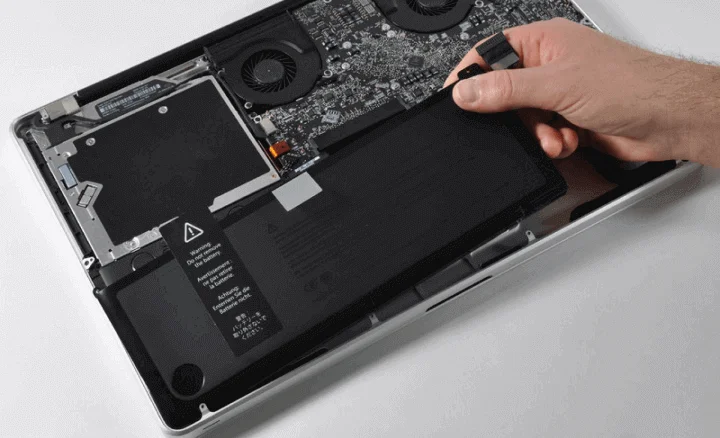
Your Apple device battery is the source of power that keeps your device working throughout the day. When your battery starts draining quickly, it affects everything you do. You might find yourself searching for a charger multiple times throughout the day, or your device might shut down unexpectedly even though the battery indicator says you have charge remaining. Understanding how your battery works and why it drains is the first step toward solving this frustrating problem. This guide will help you understand battery health and what you can do about it.
How Apple Device Batteries Work
All modern Apple devices use rechargeable lithium ion batteries. These batteries provide reliable power, but they also have limitations. Understanding how these batteries work will help you take better care of them.
Lithium ion batteries work through a chemical process that moves electrons back and forth between different parts of the battery. Each time you charge and discharge your battery, this chemical process happens. Over time, this process causes tiny damage to the battery cells, and the battery slowly loses capacity.
This degradation is completely normal and unavoidable. No battery lasts forever. The question is not how to prevent battery degradation, but how to slow it down as much as possible. The way you use and charge your device has a big impact on how quickly your battery degrades.
When a battery loses significant capacity, you might notice your device shuts down unexpectedly or charges very slowly. At this point, battery replacement is usually the best solution. Fortunately, battery replacement is much more affordable than buying a new device.
Recognizing Battery Health Problems
The first step to solving a battery problem is recognizing that you actually have one. There are several signs that your battery is not performing as well as it should.
If your device needs charging multiple times throughout the day despite light use, your battery health is probably declining. You should easily be able to use your device all day without charging if you are using it normally.
If your device shuts down suddenly even though the battery indicator shows you still have charge, this is a classic sign of poor battery health. Your device might show thirty percent battery remaining and then suddenly power off. This happens because the battery cannot provide steady power anymore.
Slow charging is another sign of battery problems. If your device takes forever to charge, or if it charges to eighty percent then charges very slowly to one hundred percent, your battery might be failing. Normal charging should be relatively quick.
If your device feels hot while charging or during use, this could indicate a battery problem. Heat is a sign that something is wrong inside your device. Do not ignore heat problems because they can damage other components.
Checking Your Battery Health
Modern Apple devices let you check your battery health. For iPhones and iPads, go to Settings, then Battery, then Battery Health and Charging. Here you can see your battery capacity percentage. If it is below eighty percent, your battery is starting to show age.
For MacBooks, hold the Option key and click on the battery icon in the menu bar. You can see your current charge and battery condition. If the condition says Replace Soon or Service Battery, your battery needs attention.
A battery at one hundred percent capacity is a new battery. As your battery ages, this number gradually decreases. At eighty percent capacity, your battery is still working okay but starting to decline. Below eighty percent, you might start noticing performance issues.
When your battery drops to around fifty percent capacity or lower, replacement becomes urgent. At this point, your device might not work reliably, and waiting too long could cause problems with other components.
Why Batteries Drain Quickly
If you have checked your battery health and it is still above eighty percent, but your battery still drains quickly, something else might be causing the problem.
Background app refresh is a common culprit. Applications can use battery power even when you are not actively using them. Go to Settings and check which apps have permission to refresh in the background. Disable background refresh for apps you do not need constant updates from.
Location services use a lot of battery power. If you have location services enabled for many apps, your battery will drain faster. Go through your apps and disable location services for apps that do not really need it.
Display brightness is another major battery drain. If you have automatic brightness disabled and manually set your brightness to very high, your battery will drain quickly. Lower your brightness to a comfortable level or enable automatic brightness adjustment.
Poor network signal causes your device to work harder and use more battery. If you are in an area with weak WiFi or cellular signal, your device uses more power searching for better signal. Try moving to a location with stronger signal.
Some apps are poorly made and use more battery than they should. If a particular app is draining your battery, try uninstalling it or checking the app store for an updated version.
Having too many notifications can also drain battery. Every notification requires your device to process information and potentially light up your screen. Turn off notifications from apps you do not need constant updates from.
Charging Habits That Damage Your Battery
The way you charge your device significantly impacts your battery health. Developing good charging habits is one of the best things you can do to extend your battery life.
Avoid completely draining your battery and then charging it to one hundred percent every single day. This deep discharge and full charge cycle stresses your battery. Instead, try to keep your charge level between twenty and eighty percent when possible.
Avoid leaving your device plugged in overnight at one hundred percent charge. Keeping your battery at maximum charge for long periods degrades the battery. If you must charge overnight, consider using Optimized Battery Charging, which prevents your device from charging to one hundred percent until you actually need to use it.
Do not use your device while charging if possible. Using your device while charging creates extra heat, and heat is bad for battery health. Let your device charge without demanding heavy use at the same time.
Extreme temperatures are bad for batteries. Do not charge your device in very hot or very cold environments. Keep your device at room temperature while charging whenever possible.
Use the official Apple charger and cable whenever possible. Third party chargers might charge faster, but they can damage your battery. Faster charging also generates more heat, which harms battery health. Stick with official Apple chargers for the best battery care.
Maximizing Your Battery Life Between Charges
Even if your battery health is good, you can take steps to make your battery last longer between charges.
Enable Low Power Mode when your battery drops below twenty percent. Low Power Mode reduces performance and restricts background activity to extend battery life. You can also enable it manually anytime you want to save battery.
Close apps that you are not actively using. Even though app switching is fast, apps running in the background still use battery power. Regularly close apps you are not using.
Turn off push email and instead set your email to fetch at intervals. Getting email pushed to your device constantly uses battery. Checking email every fifteen or thirty minutes is more efficient.
Use WiFi instead of cellular data when possible. WiFi uses less power than cellular connections. If you are somewhere with WiFi, connect to it to save battery.
Turn off vibration for notifications. Vibration actually uses more battery than sound. Consider using only sound for notifications instead of vibration.
Reduce your screen refresh rate if your device supports it. Higher refresh rates use more battery. Setting your screen to standard refresh rate instead of high refresh rate can extend battery life significantly.
When to Replace Your Battery
Battery replacement becomes important when your battery health drops significantly or when battery problems make your device unusable.
If your battery capacity is below fifty percent and your device is older than three years, replacement makes sense. Your battery is not going to improve, and waiting will only make things worse.
If your device is shutting down unexpectedly or not holding charge, battery replacement will solve these problems. A new battery will make your device feel reliable and functional again.
If your device is still relatively new but has battery problems, check if your device is still under warranty. Apple provides battery replacement at no cost for devices with defective batteries within the warranty period.
If you have already had battery replacement once, it is normal that your new battery will eventually degrade too. Battery degradation is a natural part of device aging.
Professional Battery Replacement
Do not attempt to replace your device battery yourself unless you have real experience with device repair. Opening your device to access the battery can damage other components and void your warranty.
Professional battery replacement is the safe and reliable way to fix battery problems. Technicians have the proper tools and training to safely replace batteries without damaging your device.
Ask your technician what battery warranty they offer. A good technician will guarantee their replacement battery for at least one year.
After battery replacement, your device should work reliably again. Your battery will charge properly, hold its charge all day, and not drain unexpectedly.
Conclusion
Your Apple device battery is essential to your device's functionality. By understanding how batteries work, recognizing battery health problems, developing good charging habits, and getting professional replacement when needed, you can keep your device working reliably for years. If you notice your battery draining quickly or any other battery problems, do not wait. Contact iStore Dubai today and let our expert technicians provide professional battery replacement and diagnosis. We use genuine Apple batteries and stand behind all of our work with a comprehensive warranty.

 English
 Arabic
 French
 Spanish
 Portuguese
 Deutsch
 Turkish
 Dutch
Dutch
 Italiano
 Romaian
 Portuguese (Brazil)
 Greek
Greek
