


 Downloader
 Free FTP
How can I make a professional invoice quickly?
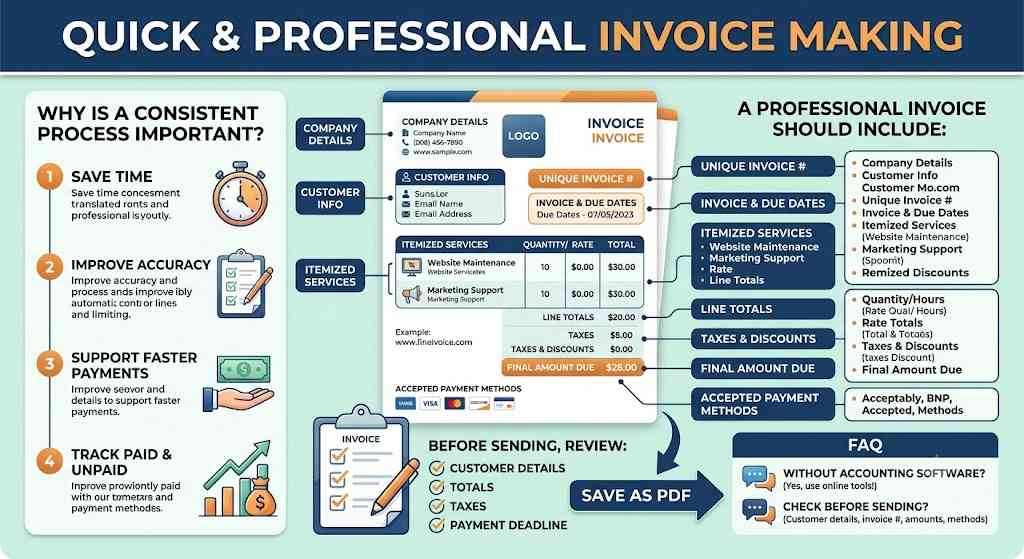
You can make a professional invoice quickly by using a clear structure that includes business details, customer information, services, pricing, taxes, payment terms, and the final amount due. With invoice making, freelancers and small businesses can create accurate billing documents faster without spending time designing every invoice from scratch.
A reliable invoice format helps you stay organised and gives customers a clear explanation of what they are paying for. It also reduces the risk of forgetting important details such as invoice numbers, due dates, tax amounts, or payment instructions.
A professional invoice should include:
- Business name and contact information
- Company logo, if available
- Customer name and billing address
- Unique invoice number
- Invoice date
- Payment due date
- Product or service descriptions
- Quantity, hours, or units
- Rate and line totals
- Taxes or discounts, if applicable
- Final amount payable
- Accepted payment methods
Service descriptions should be specific and easy to understand. Instead of writing “work completed,” mention the actual service, such as website maintenance, monthly marketing support, plumbing repair, consulting, or product delivery.
Clear descriptions reduce customer questions and make the invoice easier to review.
Why is a consistent invoicing process important?
A consistent invoicing process is important because it saves time, improves accuracy, and helps businesses maintain professional billing records. When every invoice follows the same structure, it becomes easier to create, check, send, and track each payment request.
A repeatable process can help you:
- Create invoices faster.
- Reduce missing information.
- Keep branding consistent.
- Improve customer communication.
- Organise invoice history.
- Track paid and unpaid invoices.
- Support faster payments.
Before sending any invoice, review the customer details, invoice number, service descriptions, totals, taxes, due date, and payment method. Small errors can delay payment and create unnecessary follow-up work.
Saving the finished invoice as a PDF is also recommended. This keeps the layout fixed and prevents accidental edits when the customer opens the file on another device.
For growing businesses, a clear invoicing routine makes financial administration easier. It allows owners to spend less time correcting documents and more time serving customers.
Frequently Asked Questions
Can I make an invoice without accounting software?
Yes. You can create a professional invoice using an online invoice tool without purchasing complex accounting software.
What should I check before sending an invoice?
Check the customer details, invoice number, descriptions, totals, taxes, payment deadline, and accepted payment methods before sending it.

 English
 Arabic
 French
 Spanish
 Portuguese
 Deutsch
 Turkish
 Dutch
Dutch
 Italiano
 Romaian
 Portuguese (Brazil)
 Greek
Greek
