


 Downloader
 Free FTP
PSU Repair or Replacement: Which One Should You Choose for Your PC?
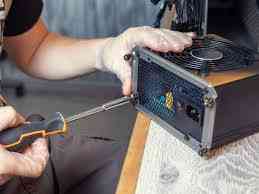
A failing power supply can cause random shutdowns, overheating, boot problems, and hardware damage. Many computer users struggle to decide between PSU repair vs replacement when their system starts showing power issues. The right choice depends on the age of the unit, repair cost, safety, and overall performance of your PC.
Understanding the warning signs early can help you avoid data loss and expensive motherboard or GPU damage. In this guide, we will explain how to identify PSU problems, compare repair and replacement options, and help you make the right decision for your computer.
What Does a PSU Do in a Computer?
The Power Supply Unit (PSU) converts electricity from the wall outlet into usable power for your computer components. It powers the motherboard, graphics card, storage drives, cooling fans, and processor.
When the PSU becomes faulty, your entire system can become unstable. According to hardware industry reports, power-related issues are among the leading causes of unexpected PC failure and component damage.
Common Signs of a Faulty PSU
Before deciding on PSU repair vs replacement, look for these common symptoms:
-
The computer randomly shuts down
-
PC fails to start properly
-
Burning smell from the case
-
Loud PSU fan noise
-
Frequent blue screen errors
-
Random restarts during gaming
-
No power reaching the motherboard
-
Flickering lights or sparks near the PSU
If you notice multiple signs together, your power supply should be tested immediately.
When PSU Repair Makes Sense
In some situations, repairing a power supply can be a practical option. Minor electrical problems or fan-related issues may be repaired by a professional technician.
Repair may be suitable if:
-
The PSU is relatively new
-
Damage is minor
-
The unit is from a trusted brand
-
Replacement parts are available
-
The repair cost is low compared to buying a new unit
Many users search for the PSU repair cost before making a decision. In general, repair costs vary depending on the damaged components and labor involved. However, very cheap repairs are not always reliable for long-term use.
When to Replace a PSU
Sometimes replacement is the safer and more cost-effective choice. Older power supplies can become unstable over time, even if they appear to work occasionally.
You should understand when to replace PSU units instead of repairing them. Replacement is usually recommended when:
-
The PSU is over 5 years old
-
Internal circuits are severely damaged
-
The unit overheats repeatedly
-
There is visible smoke or burning
-
Your PC uses high-end hardware
-
The repair cost is close to the price of a new PSU
A damaged PSU can also affect GPUs, SSDs, and motherboards. Replacing it early may prevent larger repair bills later.
Repair vs Replacement: Which Is Better?
Here is a simple comparison to help with PSU repair vs replacement decisions:
|
Repair |
Replacement |
|
Lower short-term cost |
Better long-term reliability |
|
Suitable for minor faults |
Recommended for major failures |
|
May extend PSU life temporarily |
Improves system safety |
|
Can fail again if aging parts remain |
Supports newer hardware better |
In many modern PCs, replacement is often the more dependable option, especially for gaming systems or workstations.
How to Replace a Power Supply in a PC
If repair is not worth it, you may need to replace the power supply and PC hardware completely. The process usually involves:
-
Disconnecting all cables
-
Removing the old PSU
-
Installing the new unit
-
Connecting the motherboard and GPU cables
-
Testing system stability
Choosing the correct wattage and certified PSU is important. A poor-quality power supply can reduce performance and damage expensive components.
Best Faulty PSU Solution for Long-Term Stability
The best faulty PSU solution is not always the cheapest option. Safety and reliability matter more than temporary fixes.
For long-term stability:
-
Use certified power supplies
-
Avoid low-quality generic PSUs
-
Keep your PC clean and ventilated
-
Use surge protection
-
Replace aging units before complete failure
A stable PSU improves system lifespan and reduces the risk of sudden crashes or hardware damage.
Final Thoughts
Choosing between PSU repair vs replacement depends on the condition of the power supply, repair expenses, and the age of the unit. Minor problems may be repairable, but severe damage or older PSUs are usually better replaced for safety and performance reasons.
If your computer shows repeated power issues, unusual noises, or shutdowns, do not ignore the warning signs. A professional diagnosis can help you decide whether repair is still worth it or if replacement is the smarter long-term investment.

 Arabic
 French
 Spanish
 Portuguese
 Deutsch
 Turkish
 Dutch
Dutch
 Italiano
 Russian
 Romaian
 Portuguese (Brazil)
 Greek
Greek
