


 Downloader
 Free FTP
Promote Your Product
Got a product, service, or story to share? Promote it directly to our active community and boost your brand today.
Create an Ad
Publish Bulk Blog Posts
Boost Your Reach! 📝
Have articles, guest posts, or bulk stories to publish? Send your content directly to our editorial team and feature on our platform.
Email Us Your PostsHow GTM Can Manage Conversion Tracking Without Slowing Your Site
How GTM Can Manage Conversion Tracking Without Slowing Your Site
Conversion tracking is essential for understanding whether a website is actually achieving its goals. Whether the objective is form submissions, purchases, downloads, or sign-ups, tracking user actions helps businesses measure performance and improve decision-making. However, many websites face a common challenge. As tracking scripts increase, site speed often suffers. Slow websites frustrate users and negatively impact SEO.
This is where Google Tag Manager plays a critical role. GTM allows marketers and analysts to manage conversion tracking efficiently while keeping websites fast and lightweight. This article explains how GTM works, why it does not slow down sites when used correctly, and how it supports accurate conversion tracking without compromising performance.
Why Site Speed Matters for Conversion Tracking
Site speed is closely linked to user experience and search visibility. When pages load slowly, users are more likely to abandon sessions before completing desired actions. This directly reduces conversions and distorts tracking data.
From an SEO perspective, slow-loading pages affect crawl efficiency and rankings. Search engines prioritize fast, user-friendly websites. Therefore, any conversion tracking setup must balance data accuracy with performance.
The challenge is not tracking conversions, but tracking them intelligently. GTM provides a structured way to manage this balance.
Understanding the Problem With Traditional Tracking Methods
Before GTM became widely adopted, tracking often required hardcoding scripts directly into website files. Each new marketing platform or analytics tool added another script to the site.
Over time, this created several issues. Pages loaded multiple third-party scripts at once, increasing load times. Updates required developer involvement, slowing optimization efforts. Script conflicts also caused tracking errors or broken functionality.
Most importantly, unmanaged scripts loaded on every page, even when not needed. This unnecessary execution increased page weight and reduced performance.
How Google Tag Manager Works
GTM acts as a centralized container for tracking scripts, known as tags. Instead of placing individual scripts across the site, one GTM container snippet is added to the website.
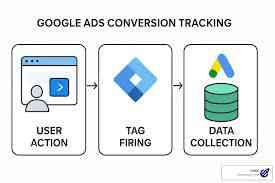
All tracking tags are then managed through the GTM interface. Tags fire based on defined triggers and conditions. This means scripts only load when necessary, such as after a user clicks a button or submits a form.
Because GTM loads asynchronously, it does not block page rendering. This is one of the key reasons it does not slow down websites when implemented correctly.
Asynchronous Loading and Performance Benefits
One of GTM’s biggest advantages is asynchronous loading. Asynchronous scripts load independently from the main page content. This allows the browser to render the page without waiting for tracking scripts to finish loading.
In contrast, synchronous scripts can delay page rendering, especially if third-party servers respond slowly. GTM avoids this issue by controlling how and when tags load.
This approach ensures that conversion tracking does not interfere with critical elements such as images, text, or navigation.
Reducing Script Bloat With GTM
Script bloat occurs when too many unnecessary scripts load on a website. GTM helps reduce this by allowing precise control over tag firing.
For example, a conversion tag can be set to fire only on a confirmation page or after a specific user action. There is no need for it to load on every page.
This selective execution minimizes resource usage and keeps the site lean. Over time, this improves page speed and ensures tracking scripts serve a clear purpose.
Managing Multiple Conversion Platforms Efficiently
Modern websites often use multiple platforms for tracking, such as analytics tools, advertising platforms, and CRM integrations. Managing these separately can be inefficient and risky.
GTM allows all conversion tracking to be managed in one place. Tags for different platforms can share triggers and variables, reducing duplication.
This centralized management prevents redundant scripts and ensures consistent data collection across platforms without adding unnecessary load to the site.
Using Triggers to Control When Tags Fire
Triggers are the backbone of performance-friendly tracking in GTM. A trigger defines when a tag should activate.
For conversion tracking, triggers can be based on page views, clicks, form submissions, scroll depth, or custom events. This ensures tags fire only when relevant actions occur.
By limiting tag execution to meaningful moments, GTM reduces background processing and avoids slowing down page interactions.
Leveraging Variables for Smarter Tracking
Variables in GTM store dynamic information such as page URLs, button text, or form IDs. These variables allow tags to adapt without additional scripts.
Instead of loading multiple tags for different scenarios, one tag can use variables to capture different values. This reduces the total number of scripts needed.
Fewer scripts mean fewer network requests, which contributes directly to better site performance.
Conversion Tracking Without Page Reloads
Many modern websites use dynamic content loading, where actions happen without full page reloads. Traditional tracking struggles in these environments.
GTM supports event-based tracking that captures conversions without relying on page refreshes. For example, form submissions or button clicks can be tracked instantly.
This not only improves data accuracy but also avoids additional page loads that could slow down the site.
Debugging and Testing Before Deployment
Poorly implemented tracking can harm performance. GTM includes a built-in preview and debug mode that allows testing before publishing changes.
Testing ensures that tags fire correctly and only when intended. It also helps identify redundant or conflicting tags that could slow down the site.
By catching issues early, GTM prevents performance problems from reaching live users.
Version Control and Safe Updates
One overlooked performance benefit of GTM is version control. Every change creates a new version that can be reviewed and rolled back if needed.
This reduces the risk of deploying heavy or broken scripts that affect site speed. Safe updates ensure performance stability while tracking evolves.
Version control also minimizes developer dependency, allowing faster optimization cycles.
GTM and Core Web Vitals
Core Web Vitals focus on loading speed, interactivity, and visual stability. Poorly managed tracking scripts often negatively impact these metrics.
Because GTM loads asynchronously and allows selective firing, it supports better Core Web Vitals performance. Tags do not interfere with initial page load or user interactions.
When used correctly, GTM aligns conversion tracking with performance best practices rather than working against them.
Common Mistakes That Cause Performance Issues
While GTM itself is performance-friendly, misuse can still cause problems. Loading too many tags, firing them on all pages, or using heavy custom scripts can negate its benefits.
Another mistake is ignoring tag audits. Over time, unused or outdated tags accumulate, increasing load unnecessarily.
Regular audits and cleanups are essential to maintain a fast and efficient tracking setup.
Best Practices for Performance-Friendly Conversion Tracking
To keep sites fast, only track actions that matter. Avoid firing tags globally when they are only needed on specific pages.
Use event-based triggers instead of page-based triggers when possible. Minimize custom JavaScript and rely on built-in GTM features.
Regularly review tag usage, triggers, and variables to ensure everything serves a clear purpose.
Why GTM Is Preferred by SEO and Analytics Teams
SEO and analytics teams value GTM because it balances data collection with performance. It allows detailed conversion tracking without sacrificing speed or user experience.
By controlling when and how scripts load, GTM supports both marketing insights and technical SEO goals. This makes it a standard tool across industries.
Many organizations refine these setups with insights and frameworks shared by Leading Digital Marketing Agency in the USA, who often manage GTM at scale for complex websites.
Long-Term Benefits of Using GTM for Conversion Tracking
Over time, GTM simplifies optimization. New conversions can be tracked without rewriting code. Old tags can be removed easily.
This flexibility keeps websites agile while maintaining performance standards. It also reduces technical debt caused by unmanaged scripts.
As websites grow, GTM scales with them without increasing load unnecessarily.
Conclusion
Google Tag Manager enables accurate conversion tracking without slowing down websites when used correctly. Through asynchronous loading, selective tag firing, and centralized management, it eliminates many performance issues associated with traditional tracking methods.
By focusing on efficiency, testing thoroughly, and maintaining clean tag structures, websites can gain deep insights into user behavior while preserving speed, SEO health, and user experience.
When conversion tracking supports performance instead of harming it, businesses gain clearer data, happier users, and stronger long-term results.
FAQs
Does Google Tag Manager slow down a website?
When implemented correctly, Google Tag Manager does not slow down a website. It loads tags asynchronously, meaning the page content loads first while tracking scripts run in the background without blocking rendering or user interaction.
Can GTM replace all hardcoded tracking scripts?
In most cases, yes. GTM allows you to manage analytics, conversion, and marketing tags from a single container, reducing the need for hardcoded scripts. However, some platform-specific scripts may still require limited direct integration.
How does GTM improve conversion tracking accuracy?
GTM improves accuracy by firing tags based on specific user actions such as clicks, submissions, or events. This ensures conversions are tracked at the right moment without relying only on page loads.
Is GTM suitable for websites with high traffic?
Yes, GTM is designed to scale efficiently. High-traffic websites benefit from centralized tag management, selective firing, and version control, which help maintain performance while handling large volumes of user interactions.
Can GTM track conversions without page reloads?
Yes, GTM supports event-based tracking, making it ideal for modern websites where actions occur dynamically. Conversions like form submissions or button clicks can be tracked instantly without slowing down the page.
What happens if a GTM tag is misconfigured?
Misconfigured tags may fire incorrectly or not at all, but they usually do not break the site. GTM’s preview and debug mode helps test configurations before publishing, reducing performance and data risks.
How often should GTM tags be audited?
It is recommended to audit GTM tags every three to six months. Regular audits help remove unused tags, reduce script bloat, and ensure conversion tracking remains accurate and performance-friendly.
Does GTM affect Core Web Vitals?
When used properly, GTM supports good Core Web Vitals by loading scripts asynchronously and allowing precise control over tag execution. Poor configuration, however, can still impact metrics, making best practices essential.

 English
 Arabic
 Spanish
 Portuguese
 Deutsch
 Turkish
 Dutch
Dutch
 Italiano
 Russian
 Romaian
 Portuguese (Brazil)
 Greek
Greek
