


 Downloader
 Free FTP
Promote Your Product
Got a product, service, or story to share? Promote it directly to our active community and boost your brand today.
Create an Ad
Publish Bulk Blog Posts
Boost Your Reach! 📝
Have articles, guest posts, or bulk stories to publish? Send your content directly to our editorial team and feature on our platform.
Email Us Your PostsWhy Better Folder Systems Are Becoming Essential for Growing Teams
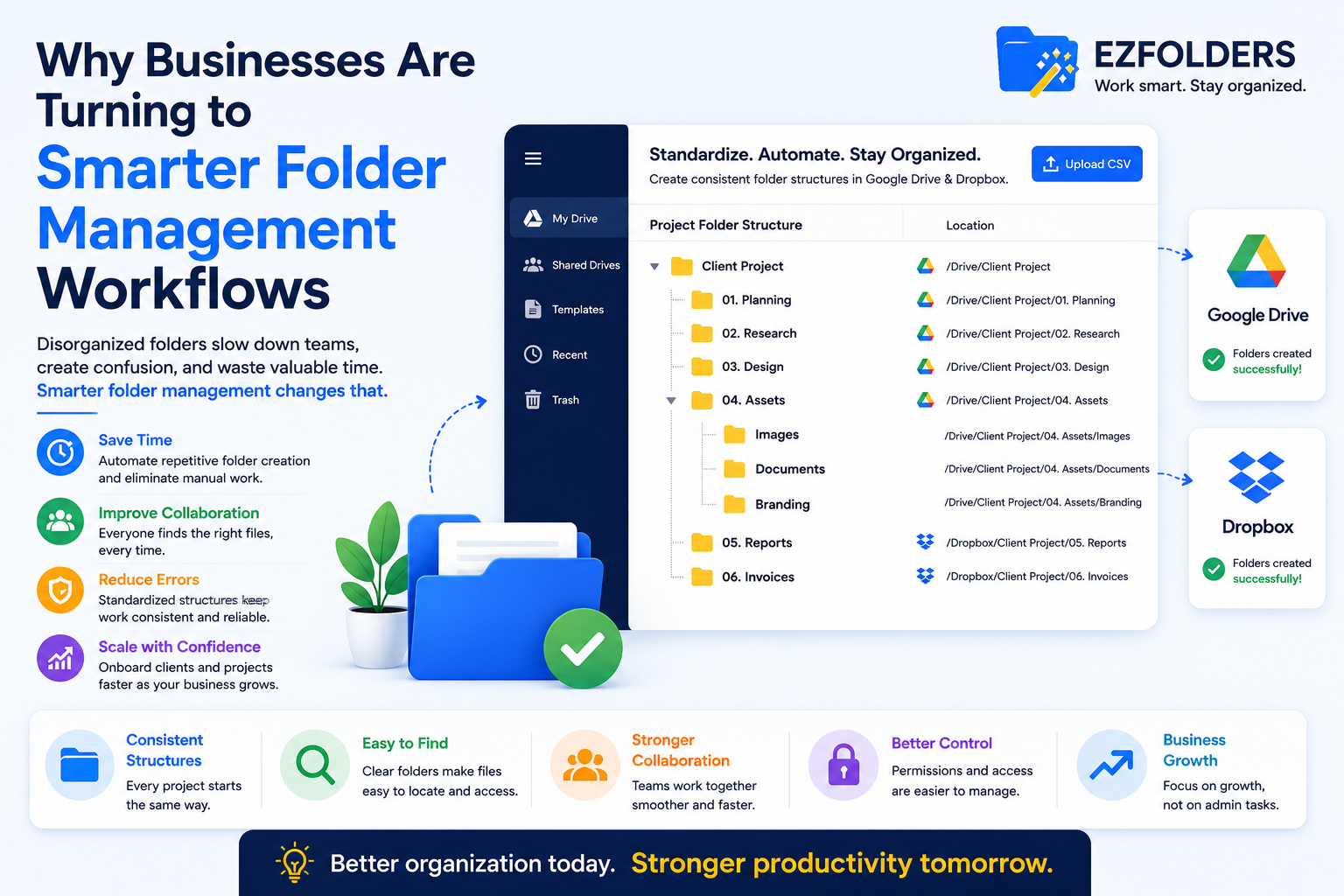
As businesses grow, digital file management becomes more complicated than most teams expect. In the early days, folders are usually simple. There may be a few client files, internal documents, and project assets stored neatly in one place. But over time, things change. More people join the team, more projects start running at once, and more documents need to be shared across departments. Without a clear system, folders begin to multiply in inconsistent ways, and finding the right file becomes harder than it should be.
This problem often hides in plain sight because folder creation feels like a minor administrative task. It is easy to assume that people will simply create folders as needed and that things will stay manageable. In reality, the opposite tends to happen. One employee sets up a client folder one way, another creates a project workspace differently, and someone else duplicates an old folder tree without cleaning it up properly. Before long, the business has a digital filing system that no longer feels reliable.
That is why more teams are paying attention to Dropbox folder automation and similar workflow improvements. Folder setup is no longer just about staying organized. It is about building a consistent structure that supports collaboration, reduces wasted time, and helps teams work more efficiently as the business scales.
The Hidden Cost of Inconsistent Folder Creation
Many companies underestimate how much time is lost to inconsistent folder management. The impact is rarely dramatic in a single moment, but it builds over time. Team members spend extra minutes searching for documents, checking multiple folders for the latest version of a file, or recreating folder structures from scratch because there is no standard way to set them up.
Consider a creative agency managing campaigns for multiple clients. Each client may need folders for contracts, strategy documents, content drafts, design assets, reports, invoices, and approvals. If every account manager creates those folders manually, the structures will almost always vary. One manager may use a “Reports” folder with monthly subfolders, while another stores reports by campaign. One may create a separate folder for raw assets, while another mixes them with final deliverables.
At first, these differences seem harmless. But when another team member needs to step in, the inconsistency becomes a real obstacle. Files are harder to find, handoffs take longer, and onboarding new staff becomes more confusing. What should be a simple shared system starts creating unnecessary friction.
This happens across many industries, not just agencies. HR teams face it when onboarding employees, finance teams face it when building data rooms, and operations teams face it when organizing vendor documentation or internal projects. The common issue is the same: manual folder creation often leads to unpredictable results.
Why Folder Structure Is Part of the Workflow
Folder systems are often treated as background admin work, but in reality they shape how work gets done. A good folder structure acts as an invisible guide for the team. It tells people where documents belong, how work is organized, and where to find the materials they need without asking around.
Imagine a consulting firm that works with dozens of clients at once. Every client engagement may involve proposals, contracts, research files, presentations, invoices, and final deliverables. If each consultant organizes those materials differently, collaboration becomes difficult. But if every client workspace starts with the same folder structure, anyone on the team can step in and understand the setup immediately.
This is why standardized folder systems matter. They create a repeatable framework for recurring work. Instead of relying on memory or personal habits, teams use a shared structure that supports consistency across projects and departments.
Folder structure also affects speed. When employees know exactly where to save and find documents, they spend less time on low-value administrative tasks. That may not sound dramatic, but across dozens of employees and hundreds of files, the productivity impact becomes significant.
How Automation Helps Businesses Build Better Folder Systems
Manual folder setup works when the business is very small and the number of projects is limited. Once recurring workflows become more common, manual setup starts to break down. It is too easy for people to forget subfolders, use inconsistent naming, or skip steps when they are busy.
Automation helps solve this by turning folder creation into a repeatable process. Instead of building a folder tree manually every time a new client or project begins, teams can use predefined structures that are created the same way every time. That makes setup faster and more reliable.
Take a property management company as an example. Every property might require folders for lease agreements, maintenance records, invoices, tenant communication, inspection reports, and legal documentation. Without a repeatable system, property managers may build those folders differently for each building. With automation, every new property can begin with the same folder layout, making it easier for the whole team to work from a consistent structure.
The same idea applies in healthcare staffing, accounting, law, recruitment, and internal operations. Any business that repeatedly creates similar folders can benefit from a more automated and structured approach.
What Teams Gain From Standardized Folder Workflows
The most obvious benefit of a better folder creation process is time savings. Teams no longer need to build the same structures from scratch or spend extra time fixing inconsistencies later. But the advantages go beyond speed.
Consistency improves collaboration because everyone works from the same system. New employees learn the workflow faster. Managers spend less time correcting mistakes. Team members can hand off work more easily because folders look familiar from one project to the next.
There is also a quality and risk benefit. In industries where documentation matters, such as finance, legal, healthcare, or compliance, missing or misplaced files can create serious issues. A repeatable folder system reduces the chance of important records being stored in the wrong place or forgotten altogether.
Standardized folder workflows also support future automation. Businesses often want to automate approvals, document collection, reporting, or client onboarding. Those workflows work much better when the underlying folder structure is predictable.
What to Look for in a Smarter Folder Setup Process
A good folder system should reflect the real work of the business. It should not be overly complicated, but it should include the folders and subfolders people genuinely need to do their jobs.
For example, a recruitment firm may need a consistent structure for candidate resumes, interview notes, client communication, offer letters, and onboarding documents. A finance team may need folders for due diligence, contracts, audit records, and investor reports. The right folder setup depends on the workflow, but the principle is always the same: the structure should be repeatable and easy to understand.
It should also be flexible enough to scale. A folder system that works for five clients should still work for fifty. Teams should be able to expand without redesigning their entire filing approach every few months.
This is where purpose-built tools can help. Solutions like Ezfolders are designed for businesses that need repeatable folder structures in environments such as Dropbox and Google Drive. Instead of manually rebuilding the same folder trees, teams can create a more consistent system that supports their actual workflow.
Why Businesses Are Thinking Beyond One Platform
While Dropbox is a common choice for file sharing and collaboration, many businesses work across multiple cloud storage platforms. Some teams prefer Dropbox for external collaboration, while others rely on Google Drive for internal projects or cross-functional teamwork. That makes folder standardization even more important.
A business may use one structure for client work in Dropbox and another for internal planning in Google Drive. Without a clear process, those environments quickly drift apart. Teams end up wasting time trying to remember which files live where and how each workspace is organized.
This is one reason people are increasingly interested in repeatable systems like a project folder template Google Drive rather than relying on ad hoc folder creation. Once teams realize how much easier work becomes with a consistent setup, they start looking for ways to bring that same structure across every platform they use.
Final Thoughts
Folder management is one of those operational details that rarely gets attention until it starts causing problems. Yet it affects how teams collaborate, how quickly they can find information, and how smoothly recurring work gets done. Inconsistent manual folder creation may seem manageable in the short term, but as businesses grow, it becomes a source of friction that slows everything down.
Standardized and automated folder workflows help solve that problem by creating a repeatable foundation for projects, clients, employees, and internal processes. They reduce wasted time, improve consistency, and make shared workspaces easier to navigate for everyone involved.
For businesses that rely on digital collaboration every day, better folder systems are not just a matter of tidiness. They are a practical way to work faster, scale more smoothly, and build workflows that hold up as the organization grows.
FAQs
1. What is Dropbox folder automation?
Dropbox folder automation refers to using a structured process or tool to automatically create repeatable folder and subfolder systems in Dropbox instead of building them manually every time.
2. Why do businesses need standardized folder structures?
Standardized folder structures reduce confusion, save time, improve collaboration, and make it easier for teams to find files and follow consistent workflows across projects and departments.
3. Which businesses benefit most from automated folder creation?
Agencies, consultants, HR teams, operations departments, finance teams, healthcare organizations, and any business managing recurring workflows or large volumes of shared documents can benefit.
4. Can better folder systems improve team productivity?
Yes. A clear and repeatable folder structure reduces time spent searching for files, makes onboarding easier, supports smoother handoffs, and creates a more reliable foundation for collaboration.

 English
 Arabic
 Spanish
 Portuguese
 Deutsch
 Turkish
 Dutch
Dutch
 Italiano
 Russian
 Romaian
 Portuguese (Brazil)
 Greek
Greek
