


 Downloader
 Free FTP
Promote Your Product
Got a product, service, or story to share? Promote it directly to our active community and boost your brand today.
Create an Ad
Publish Bulk Blog Posts
Boost Your Reach! 📝
Have articles, guest posts, or bulk stories to publish? Send your content directly to our editorial team and feature on our platform.
Email Us Your PostsCan the Police Track Tor Users? The Truth About Anonymity
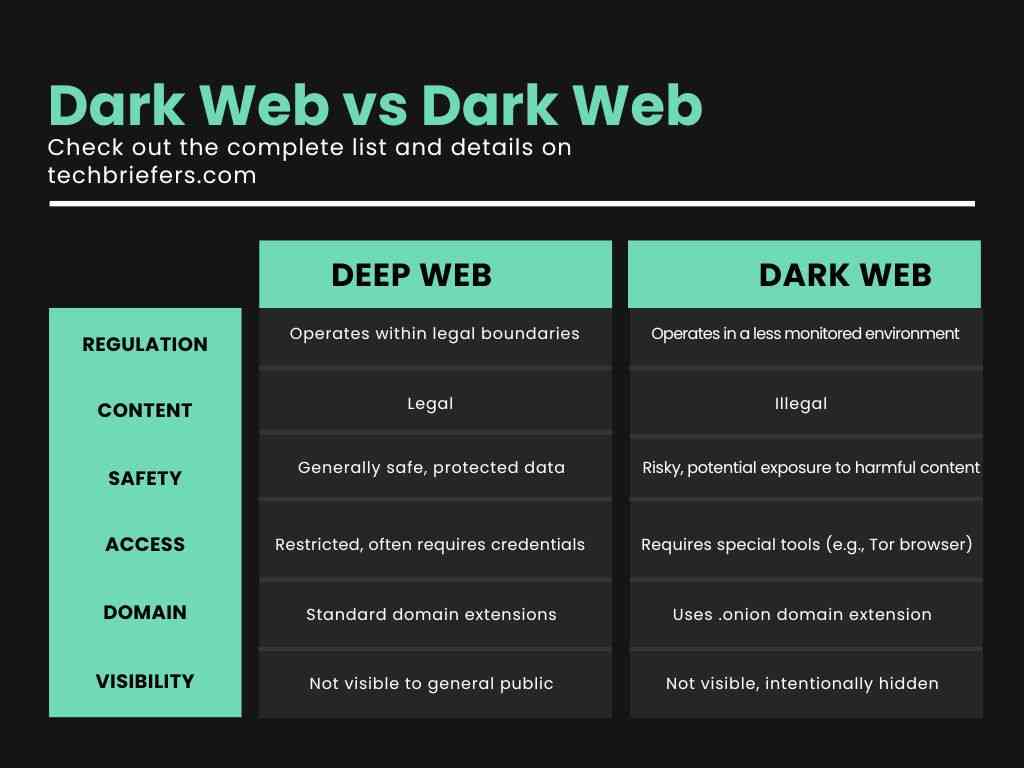
Did you know that the same technology used by journalists to hide from dictators is also under constant watch by global investigators? You are likely here because you want to know if the Tor Browser truly keeps you invisible or if your digital trail is open for everyone to see. Many people worry about their privacy when they explore the deeper parts of the web. You are not alone in this concern. Staying private is harder than it used to be because tracking tools are now very advanced. In this guide, you will learn how the police approach the network, what errors lead to discovery and how you can protect your identity while using onion links.
Quick Answer - Can the Police Track Tor?
The police cannot easily "crack" Tor's encryption to see what you do in real time. They can identify you if you make personal mistakes or if they control the entry and exit points of the network. Many successful tracking happens through human error or - following a trail of data outside the browser itself.
What is Tor & How It Works
Tor is a special software that hides your location and your online activity. It stands for "The Onion Router" When you use it, your data moves through three different layers of volunteer servers across the globe - this process wraps your data in encryption, much like the layers of an onion. People use it to bypass blocks, reach onion links and keep their browsing habits away from companies or governments.
Because the data travels through multiple hops, the website you visit cannot see your real home address. Only the first server knows where you are and only the last server knows where you are going. No single point in the chain knows both pieces of information - this system is the main reason why many people trust it for privacy.
Why Tracking Attempts Happen
Even with great technology, total invisibility is a challenge - this is why users sometimes lose their privacy
- Wrong habits
Users log into personal social media accounts while using the browser. - Outdated info
Using old versions of the software that have known bugs. - Misunderstanding
Thinking that Tor protects all the apps on your computer, when it only protects the browser. - External limits
Law enforcement may run their own servers to watch data as it leaves the network.
3 Common Tor Security Mistakes
1 - Changing the Browser Window Size
If you maximize your window, websites can see your exact screen resolution - this creates a unique "fingerprint" that identifies you.
Fix
Keep the window at the default size the browser opens with.
2 - Using Your Real Identity
Many individuals use Dread Forum or other communities but use a username they also use on Google or Reddit.
Fix
Create entirely new, random identities for your anonymous browsing.
3 - Clicking Dangerous Links
Users often click on fake dark web sites that contain tracking scripts.
Fix
Always verify your links using a trusted directory of onion sites.
How to Improve Your Privacy Step-by-Step
Step 1 - Use a Clean System
Ensure your computer is free of malware - Some viruses can "phone home" and reveal your IP address even if you are using Tor.
Step 2 - Adjust Security Levels
Move the security slider in the browser to "Safer" or "Safest" This turns off features like JavaScript that investigators use to find your real location.
Step 3 - Access Trusted Markets Safely
If you are looking at services like Piranha Market, never use your real name or address for anything. Use encrypted messaging for all communication.
Common Problems & Fixes
Problem
The browser feels too slow to use.
Fix
This is normal because your data travels through three countries. Do not use a VPN with Tor unless you are an expert, as it can actually make tracking easier.
Problem
I cannot open certain .onion pages.
Fix
Check if the site is down or if you have the correct link. You can find updated lists in a guide to the dark web.
Problem
I am worried about my Internet Provider seeing that I use Tor.
Fix
Use "Bridges" in the Tor settings - This hides the fact that you are using the network from your service provider.
Pro Tips for Tor Users
- Never download files like PDFs or Word docs while online - they can ping a server when you open them.
- Disable your webcam and microphone physically or with a sticker.
- Avoid using the same browser for Tor and for your normal daily surfing.
Safety & Best Practices
Being safe is about how you act, not just the tools you use. Treat the network as a place where you are a guest. Do not share details about your daily life, your city or your hobbies. If you want to understand more about the culture and risks, read about darknet trends and meanings to stay informed. Always keep your software updated to the latest version to avoid security gaps.
Related Guides
- Tor for Beginners
- Common Problems with Onion Links
- Best Tools for Private Browsing
FAQ
Can the police see my IP address on Tor?
Generally, no - Your IP address is hidden behind three layers of servers. They can only see it if they compromise your computer or if you reveal it yourself.
Is using the Tor Browser illegal?
In most countries, using the browser is perfectly legal - It is a tool for privacy. What you do with that tool must still follow your local laws.
Can investigators see what I am typing?
They cannot see your keystrokes through the network - They would need to install a "keylogger" directly on your device to see what you type in real time.
Do exit nodes watch my traffic?
The person running an exit node can see the data leaving the network but they do not know who sent it - this is why you should always use HTTPS websites.
Conclusion
The question of if the police can track Tor users is complex. While the network itself is very strong, the person using it is often the weakest link. By avoiding common mistakes and following strict safety steps, you can keep your identity private. Remember that your behavior is your best defense. Stay safe, keep your software updated and always verify your links before clicking. Tor remains a powerful tool for anyone who values their digital freedom.

 English
 Arabic
 French
 Spanish
 Portuguese
 Deutsch
 Turkish
 Dutch
Dutch
 Italiano
 Romaian
 Portuguese (Brazil)
 Greek
Greek
